Python Examples
compas_nest is the COMPAS plugin for 2D nesting — the
Python route into the same OpenNest engines. The examples here are written for Rhino 8 users: paste any one
straight into the Script Editor (Python 3). The # r: compas_nest header installs the package on the first
Run, and a COMPAS Scene draws the result into your Rhino document.
compas_nest wraps OpenNest's two 2D engines, same API — opennest_collision() (physics / overlap‑relaxation,
dense, nests into holes) and opennest() (NFP + genetic algorithm). The third engine, nest_spectral (3D mesh
packing), has no Python wrapper — it is reached through the OpenNest3D Grasshopper component. Every nest is
3 steps: build the parts + sheets, nest, draw.
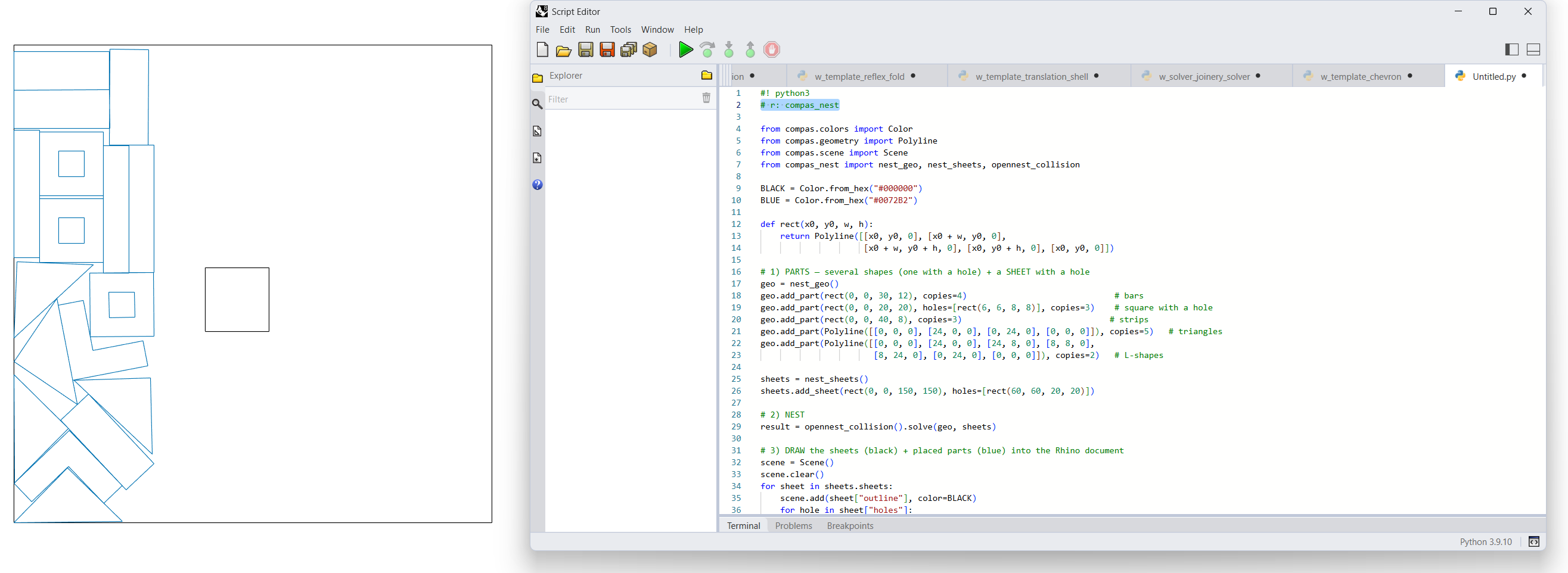
The same 8 examples as the C++ and C# pages — here in Python/COMPAS:
| # | Example |
|---|---|
| 01 | Collision — physics nest, parts + holes into a sheet + hole |
| 02 | NFP + GA — NFP + genetic-algorithm engine |
| 03 | Live animation — run on a worker thread, poll the evolving layout |
| 04 | Clearance offset — grow parts / shrink sheets before nesting |
| 05 | Attributes — geometry that travels with the placed part |
| 06 | Pack (array) — deterministic grid, columns per row |
| 07 | Pack (distance) — grid, wrap at a max width |
| 08 | Text (font) — single-stroke engraving polylines |
Each example page also offers a standalone download — a zip with run.bat (Windows) / run.command
(macOS/Linux) that pip installs compas_nest and runs main.py outside Rhino (a compas_viewer window
shows the result). Same script either way: paste it into the Rhino Script Editor, or download and run it.
Run it in the Rhino 8 Script Editor
Rhino 8's Python is CPython 3.9 (py39-rh8). Open the Script Editor (_ScriptEditor), make a new
Python 3 script, and put the requirements header at the very top — the first Run pip‑installs the package
(the editor freezes briefly while it does):
#! python3
# r: compas_nest
To show results, draw straight into the Rhino document with a COMPAS Scene — no compas_viewer needed
(that's for a standalone window): scene.add(geometry, color=…) then scene.draw().
Two honest caveats inside Rhino
- Compiled backend.
compas_nestis C++ (via nanobind), so it needs Rhino 8's CPython runtime — it will not load under IronPython. It works because PyPI ships a CPython‑3.9 wheel matching Rhino 8, so no local compiler is needed; COMPAS flags Rhino 8 CPython support as experimental. - Use
Scene, not the viewer.compas_nest.viewer.animate()opens a standalonecompas_viewer(PyQt/OpenGL) window — that is not the Rhino viewport. Inside Rhino, draw with a COMPASSceneas shown in the examples (or bake viacompas_rhino.conversions).
Installing into Rhino 8 — three paths
| Path | How |
|---|---|
| In‑editor header (recommended) | Put # r: compas_nest (or # requirements: compas_nest) under #! python3 at the top; Run once to install. Pin with # r: compas_nest==0.1.0; isolate with # venv: nesting. |
| Manual pip (most reliable) | Windows: %USERPROFILE%\.rhinocode\py39-rh8\python.exe -m pip install compas_nest · macOS: ~/.rhinocode/py39-rh8/python3.9 -m pip install compas_nest |
| COMPAS helper | In a normal Python env with COMPAS installed: install_in_rhino compas_nest |
compas (>=2.15,<3) and numpy (>=1.24) come in as dependencies.
The key pieces
| Use this | For | Import |
|---|---|---|
nest_geo |
the parts to nest (outlines + holes + copies + attributes) | from compas_nest import nest_geo |
nest_sheets |
the sheets to pack onto (outlines + keep‑out holes) | from compas_nest import nest_sheets |
opennest_collision / opennest |
run the solve | from compas_nest import opennest_collision, opennest |
pack |
deterministic grid layout (no nesting) | from compas_nest import pack |
offset_geo / offset_sheets |
clearance before solving | from compas_nest import offset_geo, offset_sheets |
text_to_polylines |
single-stroke labels | from compas_nest import text_to_polylines |
nest_result |
read placements (returned by .solve()) |
— |
Both engines follow the same pattern: construct with tuning params, then .solve(geo, sheets) → a nest_result.
Read it with result.placed_polylines() (grouped per sheet) or result.transformation(placement).
API reference
nest_geo, nest_sheets
class nest_geo(parts=None, name=None)
    add_part(outline, holes=None, copies=1, attributes=None) -> int
    # outline    : closed Polyline (outer ring)
    # holes      : list[Polyline], interior holes (kept empty)
    # copies     : number of identical copies to nest
    # attributes : list[Geometry] carried along with the placement (e.g. Points)

class nest_sheets(sheets=None, name=None)
    add_sheet(outline, holes=None) -> int          # holes = forbidden interior regions
    @classmethod from_size(width, height, count=1, gap=None) -> nest_sheets
    origins() -> list[tuple[float, float]]          # each sheet's world origin
the two 2D engines
class opennest_collision(iterations=4000, num_rotations=3600, spacing=0.0, seed=100,
    n_starts=1, part_holes_mode=1, pole_max=16, final_compact=2, fit_mode=1,
    max_sheets=0, time_budget_secs=0.0, simplify_tolerance=0.0, verbose=True)
    solve(geo, sheets) -> nest_result      # blocking
    start(geo, sheets) -> collision_solve  # non-blocking background handle

class opennest(generations=10, rotations=8, placement_type=1, spacing=0.0, seed=30,
    mutation_rate=10, population_size=10, use_holes=True, try_all_rotations=False,
    exact_nfp=False, mode=1, num_seeds=4, use_parallel=True, curve_tolerance=0.3,
    clipper_scale=1e7, sheet_spacing=0.0, rotation_limit=360.0, time_budget_secs=0.0,
    max_sheets=0, verbose=True)
    solve(geo, sheets) -> nest_result      # blocking
    start(geo, sheets) -> nfp_solve        # non-blocking background handle
Knob semantics line up with the native structs on the C++ API page.
nest_result, pack, offset, text
class nest_result(placements, geo, sheet_origins, n_sheets, fitness=None)
    placed / unplaced                                  # properties
    transformation(placement) -> Transformation
    placed_polylines(geo=None) -> list[dict]           # grouped per sheet; each part dict has
                                                       #   "outline", "holes", "attributes"
    to_json(filepath) -> str ; to_obj(filepath) -> str

pack(geo, columns=10, gap_x=10.0, gap_y=10.0, max_width=None) -> nest_result
offset_polyline(polyline, distance) -> Polyline | None
offset_geo(geo, distance) -> nest_geo ; offset_sheets(sheets, distance) -> nest_sheets
text_to_polylines(text, height=1.0, font="regular", frame=None) -> list[Polyline]
Where this fits
OpenNest's nesting engines are native C++ with a C# wrapper for Grasshopper/Rhino — see the
C++ API and C# API. compas_nest is the Python/COMPAS route over those same engines
(np_nest physics + nfp_nest NFP/GA), bound via nanobind. For the no‑code Grasshopper path, see
OpenNest2.